कई businesses को WhatsApp पर messages तो बहुत मिलते हैं, लेकिन उनमें गलत location, irrelevant requirement, low buying intent या incomplete follow-up जैसी problems होती हैं। इसलिए WhatsApp lead-generation campaign का goal केवल ज्यादा chats generate करना नहीं होना चाहिए।
सही goal है relevant लोगों को attract करना, conversation शुरू करना, उन्हें efficiently qualify करना और suitable leads को appointment, consultation, quotation या sale जैसे अगले business step तक ले जाना। इस detailed guide में हम समझेंगे कि Indian businesses Meta Ads से qualified WhatsApp leads generate करने के लिए पूरा system कैसे बना सकते हैं।
Quick Answer: Meta Ads से WhatsApp Leads कैसे आती हैं?
एक practical WhatsApp lead-generation system इस तरह काम करता है:
- पहले Qualified Lead define करें।
- Clear offer तैयार करें।
- Facebook/Instagram ad से user को WhatsApp पर भेजें।
- Ad और WhatsApp opening message को match करें।
- Enquiry का जल्दी और proper response दें।
- Few useful qualification questions पूछें।
- Suitable lead को next action दें।
- No-response leads का polite follow-up करें।
- Lead status और quality record करें।
- Qualified conversations के आधार पर campaign optimize करें।
Click-to-WhatsApp Ads क्या होते हैं?
Meta Ads के through Facebook या Instagram पर advertisement देखने वाला user directly WhatsApp conversation शुरू कर सकता है। उसे phone number search या copy करने, WhatsApp में business को अलग से ढूँढने या कई pages navigate करने की जरूरत नहीं रहती।
यह journey को छोटा कर सकता है, लेकिन WhatsApp खोलना अपने-आप qualified lead नहीं बनाता। Meta Ads Manager का interface और labels समय के साथ बदल सकते हैं, इसलिए अपने account में available current options verify करें और outdated UI instructions पर depend न करें।
WhatsApp Lead Generation किन Businesses के लिए Useful हो सकती है?
WhatsApp उन businesses के लिए useful हो सकती है जहाँ customer action से पहले short conversation चाहता है—Ayurvedic clinic में consultation enquiry, healthcare clinic में appointment, gym में trial या membership, education में course counselling, real estate में project details या site visit, spa में booking और B2B में product requirement.
Conversation-based journey
जब few questions के बाद सही service, availability या next step decide हो सकता है, WhatsApp convenient रहता है।
Team readiness जरूरी है
अगर team consistently reply नहीं करती, enquiries handle करने का system नहीं है, qualification नहीं होती या conversations track नहीं होतीं, तो WhatsApp campaign कमजोर पड़ सकती है।
Step 1: Ads शुरू करने से पहले Qualified WhatsApp Lead Define करें
Possible qualification factors में सही location, relevant requirement, suitable budget, correct eligibility, realistic timeline, genuine customer या business need और आगे conversation करने की willingness शामिल हो सकती है। हर business अपनी definition अलग बनाए।
यह definition marketing और sales team को same outcome measure करने देती है। इसके बिना campaign cheap message volume के लिए optimize हो सकती है जबकि business को useful enquiries नहीं मिलतीं।
Step 2: User को WhatsApp Message करने की Clear वजह दें
“Message us for more information” weak है क्योंकि user को expected value या next step नहीं पता। Offer clear, honest, relevant, easy to understand और अगले business action से connected होना चाहिए।
Fake urgency या misleading offers avoid करें। Short-term chat volume के लिए trust और lead quality को compromise नहीं करना चाहिए।
Step 3: Meta Ads Campaign को WhatsApp Conversations के लिए Setup करें
Setup में correct business assets, सही WhatsApp business destination, suitable campaign setup, audience, location, budget, placements, creative, CTA और conversation flow verify करें।
Step 4: उन्हीं लोगों को Target करें जिन्हें Business Serve कर सकता है
Location, practical service radius, genuinely relevant age, business geography और audience size पहले check करें। Appropriate existing customer data, interest testing, broader audience testing और suitable retargeting को controlled तरीके से compare किया जा सकता है।
कोई targeting method हमेशा best नहीं है। अगर gym Noida में है तो ऐसी cheap WhatsApp enquiries का कोई फायदा नहीं जो service area से बाहर हों। Raw conversation cost के साथ location और qualified outcome जरूर देखें।
Step 5: ऐसे Ad Creatives बनाएं जो Conversation के लिए User को Prepare करें
Creative जल्दी बताए कि ad किसके लिए है, problem क्या है, service या offer क्या है, WhatsApp पर message क्यों करना है और next step क्या होगा। Short vertical video, expert या founder video, static poster, problem-based creative, service explanation, FAQ, genuine testimonial, AI-assisted video और carousel suitable formats हो सकते हैं।
Problem-focused video, offer poster और expert explanation जैसे meaningfully different concepts test करें। केवल button colour बदलना नया test नहीं है। DigiflyX की existing AI Video Creatives service short-form variations में support कर सकती है, लेकिन result message, offer और execution पर depend करता है।
Step 6: Ad और WhatsApp Conversation का Message Match करें
अगर Ad कहता है “Book a Fitness Assessment” और WhatsApp opening केवल “Hello, how can we help?” है, तो user को context फिर से समझाना पड़ता है।
Ad, service name, offer और opening message में continuity confusion कम करती है और qualification naturally शुरू होती है।
Step 7: पहला WhatsApp Message बेहतर बनाएं
Good first response enquiry acknowledge करे, relevant service mention करे, one useful question पूछे और next step easy बनाए। बहुत बड़ा automatic paragraph conversation शुरू होने से पहले ही user को overwhelm कर सकता है।
Step 8: Lead को Qualify करें, Interrogate नहीं
Location, required service, start timeline, approximate budget, personal या business requirement, desired outcome और specific project, course या service useful questions हो सकते हैं। हर lead को सभी questions पूछने की जरूरत नहीं।
आठ questions एक साथ न भेजें। Previous answer के आधार पर अगला relevant question पूछना conversation को natural रखता है।
अलग-अलग Businesses के लिए WhatsApp Opening Message Examples
Step 9: WhatsApp Leads के लिए Clear Response Process बनाएं
Business को working hours में जितनी जल्दी consistently possible हो, proper response देना चाहिए। किसी fake universal response-time number को guarantee नहीं माना जा सकता।
Clear ownership, notifications, missed-enquiry checks और backup responsibility बनाएं, ताकि team-member unavailable होने पर useful enquiry ignore न हो।
Step 10: Qualified Chat को Clear Next Step दें
Clinic में appointment, gym में trial या consultation, education में counselling call, real estate में site visit, B2B में quotation या sales call और spa में booking logical next action हो सकता है।
Step 11: Follow-Up करें, लेकिन Spam नहीं
कुछ leads reply करना बंद कर देती हैं। Flow initial reply, no response, polite follow-up, appropriate reminder और final check-in हो सकता है। जो user decline करे या contact बंद करने को कहे उसकी preference respect करें।
Step 12: WhatsApp Conversation के बाद Lead Status Track करें
Useful statuses हैं: New, Responded, Contacted, No Response, Not Relevant, Qualified, Appointment Booked, Quotation Sent, Customer और Closed / Not Interested.
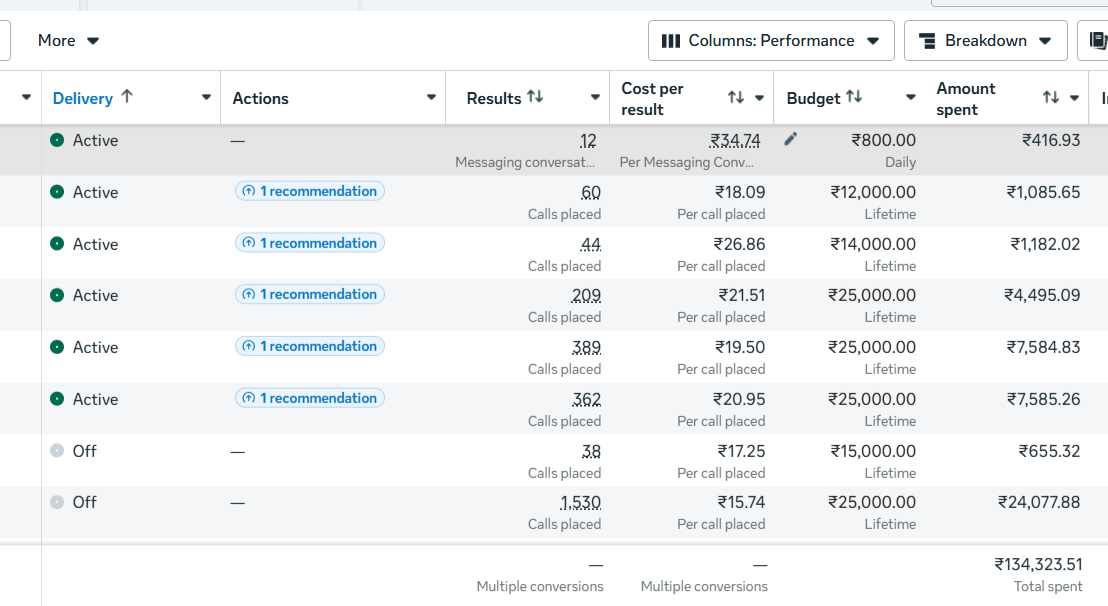
Ads Manager conversation count दिखा सकता है, लेकिन business को actual outcomes जानने चाहिए। Status data बताता है कि campaign relevant opportunities बना रही है या केवल chat volume।
Simple WhatsApp Lead Funnel कैसे बनाएं
Audience, offer और expectation set करता है।↓WhatsApp Conversation
User ad context के साथ chat शुरू करता है।↓Initial Response
Business enquiry acknowledge करता है।↓Qualification
Few questions relevance confirm करते हैं।↓Appointment / Consultation / Quote
Clear business action तय होता है।↓Follow-Up
Relevant stalled enquiry को politely revisit किया जाता है।↓Customer
Final outcome record होता है।
WhatsApp Lead Generation में कौन-से Metrics Track करें?
Ad Spend, WhatsApp Conversations, Cost per Conversation, Qualified Conversations, Cost per Qualified Lead, Response Rate, Appointment Rate, Customer Conversion Rate और reliable attribution होने पर Revenue या ROAS track करें।
Cost per Conversation
Ad Spend ÷ WhatsApp Conversations
Qualified Conversation Rate
Qualified Conversations ÷ Total Conversations × 100
Cost per Qualified WhatsApp Lead
Ad Spend ÷ Qualified WhatsApp Leads
Appointment Rate
Appointments ÷ Qualified Leads × 100
Response Rate
Useful response प्राप्त करने वाली conversations का proportion.
Customer / Revenue Outcome
Attribution reliable हो तो customers और revenue measure करें।
Cheap WhatsApp Conversations हमेशा Better क्यों नहीं होतीं?
Campaign A
- Ad Spend
- ₹12,000
- Conversations
- 80
- Cost / Conversation
- ₹150
- Qualified Leads
- 8
- Cost / Qualified Lead
- ₹1,500
Campaign B
- Ad Spend
- ₹12,000
- Conversations
- 50
- Cost / Conversation
- ₹240
- Qualified Leads
- 20
- Cost / Qualified Lead
- ₹600
इस difference को detail में समझने के लिए Lead Quality घटाए बिना Meta Ads का Cost per Lead कम करने की Hindi guide पढ़ें।
WhatsApp Leads Waste करने वाली Common Mistakes
Industry के हिसाब से WhatsApp Lead Strategy
Ayurvedic & Wellness
- Offer
- Consultation enquiry
- Qualification
- City + relevant concern
- Next Action
- Responsible consultation booking
Healthcare
- Offer
- Appointment enquiry
- Qualification
- Location + required service
- Next Action
- Appointment confirmation
Gym & Fitness
- Offer
- Trial / fitness consultation
- Qualification
- Location + membership requirement
- Next Action
- Trial booking
Education
- Offer
- Course details / counselling
- Qualification
- Course + joining timeline
- Next Action
- Counselling call
Real Estate
- Offer
- Project information
- Qualification
- Budget + self-use या investment
- Next Action
- Call या site visit
Manufacturing & B2B
- Offer
- Product information
- Qualification
- Location + quantity + requirement
- Next Action
- Quotation या sales call
WhatsApp Lead Campaign Launch करने से पहले 7-Step Checklist
01—Qualified Lead Define करें
Location, need, eligibility, budget और timeline agree करें।
02—Offer Define करें
Conversation शुरू करने की clear और honest reason दें।
03—WhatsApp Destination Verify करें
Correct business destination confirm करें।
04—Ad Creative तैयार करें
Creative, copy, offer और CTA align करें।
05—Questions तैयार करें
केवल useful qualification questions चुनें।
06—Responsibility Assign करें
Ownership, working hours और backup तय करें।
07—Lead Tracking Setup करें
Status, qualification और next action record करें।
Weekly WhatsApp Lead Campaign Review
- Ad Spend check करें।
- Total WhatsApp Conversations check करें।
- Cost per Conversation calculate करें।
- Qualified Conversations review करें।
- Cost per Qualified Lead calculate करें।
- Common enquiry questions देखें।
- Location quality check करें।
- Creative performance देखें।
- Response consistency check करें।
- Appointment / Sales outcomes review करें।
- One meaningful optimization test identify करें।
Real conversation feedback campaign decisions में वापस जाए। Repeated questions creative clarity की problem, wrong areas location issue और strong intent के बाद weak bookings follow-up problem दिखा सकते हैं।
WhatsApp Lead Campaign कब Scale करना चाहिए?
Scaling तब consider करें जब relevant conversations consistent हों, quality acceptable हो, response system properly काम करे, team अधिक enquiries handle कर सके, tracking reliable हो और customer economics make sense करें।
Budget double करने से leads double होने की guarantee नहीं है। Investment step-by-step बढ़ाएं और qualified outcomes तथा team capacity monitor करें।
WhatsApp Ads vs Meta Instant Forms vs Website Forms
| Lead route | Best for | Strength | Challenge |
|---|---|---|---|
| Conversation-based enquiries | Direct interaction | Fast follow-up needed | |
| Meta Instant Form | Structured information | Easy data capture | Poor setup low-intent submissions ला सकता है |
| Website Form | Detailed / high-value enquiries | More control और tracking | More steps और landing-page quality पर dependence |
कोई method universally best नहीं है। Business और sales process के आधार पर test करें। Full campaign context के लिए भारतीय बिज़नेस के लिए Meta Ads Lead Generation की Hindi guide पढ़ें।
क्या AI Video Creatives WhatsApp Leads में Help कर सकते हैं?
AI-assisted videos service explainers, offer videos, industry-specific videos, promotional variations और short-form creatives बनाने में मदद कर सकते हैं। लेकिन AI automatically CPL कम नहीं करता।
Result message, offer, relevance, clarity और execution पर depend करता है। DigiflyX AI Videos को strategy और meaningful creative testing के साथ use करें।
WhatsApp Leads को Responsibly Handle करें
Customer numbers publicly expose न करें, केवल enquiry से relevant information collect करें, unnecessary sensitive information avoid करें और stop-contact requests respect करें। Healthcare information को खास जिम्मेदारी से handle करें।
WhatsApp screenshot publish करने से पहले name, phone number, profile image और private details anonymize करें तथा suitable permission लें। यह practical guidance है, legal guarantee नहीं।
निष्कर्ष
Meta Ads और WhatsApp advertisement से conversation तक की journey छोटी कर सकते हैं, लेकिन WhatsApp platform खुद lead quality guarantee नहीं करता।
Goal सबसे ज्यादा WhatsApp chats generate करना नहीं है। Goal ज्यादा relevant conversations generate करना है जिनके real customers बनने की realistic संभावना हो। DigiflyX के Meta campaign results, Hindi Blog, English Blog और Digital Marketing Agency in Noida service page भी explore कर सकते हैं।
LET’S TALK
Meta Ads से Better WhatsApp Leads Generate करना चाहते हैं?
DigiflyX businesses को Meta Ads campaigns, WhatsApp lead journeys, creative testing, lead qualification, reporting और ongoing optimization plan करने में मदद करता है।
Campaign performance, WhatsApp conversation cost और lead quality business type, location, offer, competition, budget और follow-up process के अनुसार अलग हो सकते हैं।
अक्सर पूछे जाने वाले सवाल
Click-to-WhatsApp Ads क्या होते हैं?
ये Meta advertising experiences user को Facebook या Instagram ad से WhatsApp conversation में ले जाते हैं। Exact setup names बदल सकते हैं, इसलिए account में current options verify करें।
क्या WhatsApp Ads lead generation के लिए अच्छे हैं?
जब customer को conversation की जरूरत हो और business consistently respond कर सके, तब useful हो सकते हैं। Result audience, offer, creative, qualification, follow-up और sales process पर depend करता है।
Better-quality WhatsApp leads कैसे प्राप्त करें?
Qualified lead define करें, serviceable location target करें, clear offer और specific creative use करें, opening message match करें, few relevant questions पूछें और actual qualified outcomes पर optimize करें।
पहला WhatsApp message क्या होना चाहिए?
Enquiry acknowledge करें, relevant service या offer mention करें और one useful question पूछें। बहुत बड़ा generic script भेजने की जगह contextual और human response दें।
WhatsApp lead का reply कितनी जल्दी देना चाहिए?
Working hours में team जितनी जल्दी helpfully और consistently manage कर सके उतना जल्दी reply करे। Clear ownership, notifications और backup रखें; कोई universal guaranteed timing नहीं है।
WhatsApp Ads या Meta Instant Form—कौन बेहतर है?
कोई universally बेहतर नहीं। WhatsApp direct conversation देता है, Instant Form structured capture देता है। Business journey, information need और follow-up capacity के अनुसार separate tests करें।
WhatsApp Lead Quality कैसे measure करें?
हर conversation का relevance, location, qualification और status record करें। Appointments, quotations, customers और cost per qualified lead को ad spend तथा conversation volume के साथ compare करें।
Irrelevant WhatsApp enquiries क्यों आती हैं?
Vague offer, wrong geography, generic creative, unclear qualification, ad-chat mismatch या सिर्फ low-cost conversations पर optimization common causes हो सकते हैं। Chat feedback से actual problem identify करें।
क्या local businesses WhatsApp Ads use कर सकते हैं?
हाँ, खासकर appointments, trials, consultations, bookings और site visits के लिए। Practical service area target करें और conversation की शुरुआत में location confirm करें।
क्या WhatsApp follow-up में automation use करना चाहिए?
Automation acknowledgement, context, routing और reminders में मदद कर सकती है। Message relevant रहे, user preference respect करे और जरूरत पर human conversation का clear रास्ता दे।